Music and Technology Corner - Tablets for Pianists
Collecting and organizing piano, or any type of sheet music, can be a daunting task. Organizing it in binders, or even remembering where it is located becomes more and more of an issue as you expand your repertoire. Even more challenging is laying it out on the piano’s music rack during a performance (think taping together 4 or 5 sheets when a human page turner is not available).
Fortunately, options that were beyond the amateur’s reach even 5 years ago are commonplace and more affordable today. In this M&T Corner article we will explore some of the options available to the pianist.
The key to overcoming these obstacles is converting paper ‘sheet’ music into a digital form. While this may seem daunting, and such a paradigm shift from what we have been doing all our musical lives, it’s now fairly straightforward, and can be done incrementally.
Start with Collecting Digital Copies of Your Music
In order to move away from, or supplement paper copies of your music you will need to find or create a digital copy. The most common source of classical digital music is available (for Free) from IMSLP https://imslp.org. You can search by composer, type of music, or title. These public domain scores come in all types of condition, so look for one that will display clearly before you download.
Another popular source is MuseScore https://musescore.com. Some are available for free, others for a subscription cost. SheetMusicDirect http://sheetmusicdirect.com is a subscription service that has a very extensive selection of piano music in all genres along with music for the entire spectrum of musical instruments.
Finally, just searching the internet on the piece you are looking for with the keyword PDF will often result in a good digital copy. Just be careful that the site you reach appears legitimate to ensure that you are not downloading spyware!
If you are fortunate enough to have an All-In-One printer, you can scan you r existing sheet music with the printer’s provided software. This typically works regardless of whether you are running Windows, Mac, a phone, or tablet.
Obtain a Tablet and Software to Display Your Music
Once you have started collecting your digital piano music, you will need to acquire a tablet to display the music on the piano rack. Below is a link to an excellent article that examines the pros and cons of the current lineup of tablets for musicians:
https://www.tablets-for-musicians.com/best-tablets/
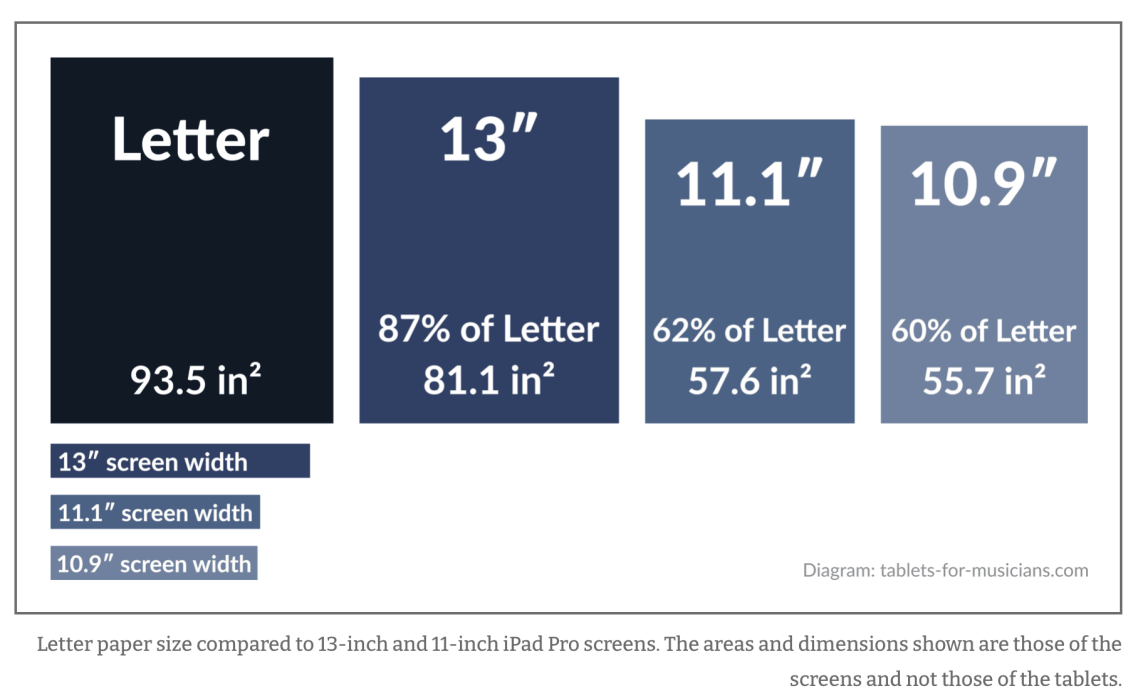
You can’t go wrong with a 12.9-inch or 13-inch iPad. The iPad Pro in particular is the most used tablet among professional musicians and has the best stylus and keyboard. iPadOS still has some exclusive apps (forScore, Newzik, GarageBand) and features (AirDrop, AirPlay), as well as the best performance of any tablet today. However, Apple iPads in general have some drawbacks, the biggest being their aspect ratio, which is ideal for office use, but not for displaying sheet music. Also, don’t expect a fast battery charge during rehearsal breaks, as the iPad Pro has the slowest charging speed of all the tablets in its category. Finally, a large iPad can be quite expensive to purchase new.